

Article Contents
Ways to Remove EasyKitchen
In some cases, you may need to completely remove EasyKitchen and all of its components.
There are two ways to do this:
- Remove the EasyKitchen plugin using the SketchUp Extension Manager.
- Uninstall EasyKitchen from the Windows Installed Apps list.
Both methods completely remove EasyKitchen from your computer.
Removing via the SketchUp Extension Manager
Launch SketchUp and open:
Extensions → Extension Manager
Switch to the Manage tab, locate EasyKitchen, and click Uninstall.
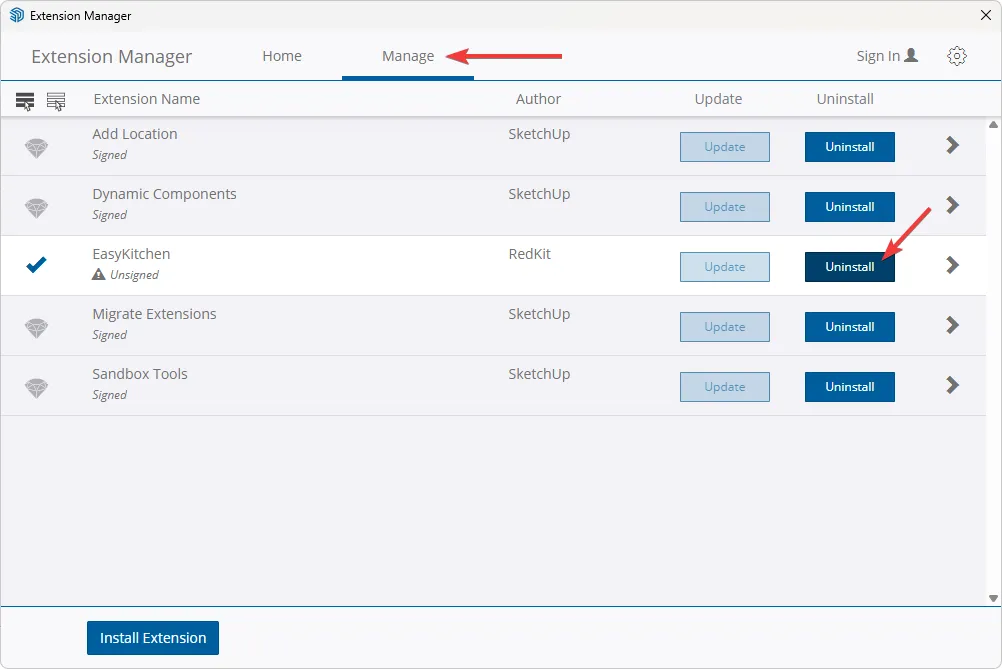
This completely removes the EasyKitchen plugin along with all of its installed components, add-ons, and materials.
Removing via Windows Installed Apps
If you prefer not to use the SketchUp Extension Manager, you can uninstall EasyKitchen through Windows.
Open Windows Settings, then navigate to:
Apps → Installed apps
Find EasyKitchen PRO in the list, click the three-dot menu next to it, and select Uninstall.