



Article Contents
General Information
This tool allows you to configure the entire EasyKitchen library according to your own standards in just a few clicks.
It can apply settings both to the original library files and to modules already placed in the current SketchUp model.
Simply review the available parameters, specify your preferred values, and the tool will automatically update all selected modules.

Preparation
Since mass configuration is a resource-intensive operation, a small amount of preparation is recommended when applying settings to the library files.
If you are only updating modules in the current project, you can skip this section.
Before starting:
- Create a new SketchUp model. It is important that the model is completely empty and contains no additional components.
- Close all tabs in SketchUp's Default Tray on the right side of the screen, or temporarily close the entire tray. This improves performance and helps prevent SketchUp from becoming unstable during processing.
How It Works
Launch the tool and first review all parameters on the right side of the window.
Adjust any values that should become your new defaults.
For example, if your company uses 16 mm chipboard (MFC), set the Panel Thickness value in the Cabinet Parameters section to 16 mm.
Every setting that will be applied is marked with a checkbox.
If you do not want a particular parameter to be applied, simply clear its checkbox.
If your workflow uses imperial units instead of metric units, click the Units switch in the upper-right corner of the window. All values will be converted to inches automatically.
After configuring the parameters, move to the left side of the window.
Here you must choose where the settings should be applied:
- Library files.
- Modules in the current project.
If you choose Library Files, you must also select which libraries should be processed.
By default, both EasyKitchen and EasyCabinets are selected.
Although both libraries can be processed simultaneously, if you experience errors or instability, it is recommended to process one library at a time.
A reminder is displayed below indicating that the current SketchUp model should be empty.
This requirement is important and should not be ignored.
The Safe Mode option is available if SketchUp crashes or reports errors during bulk processing.
In Safe Mode, the library is processed using a slower and more stable background workflow.
When everything is ready, click Apply to Selected.
The tool will begin processing immediately, and its progress will be displayed directly in the window.
You can stop the operation at any time. In that case, only the modules that have already been processed will keep the new settings.
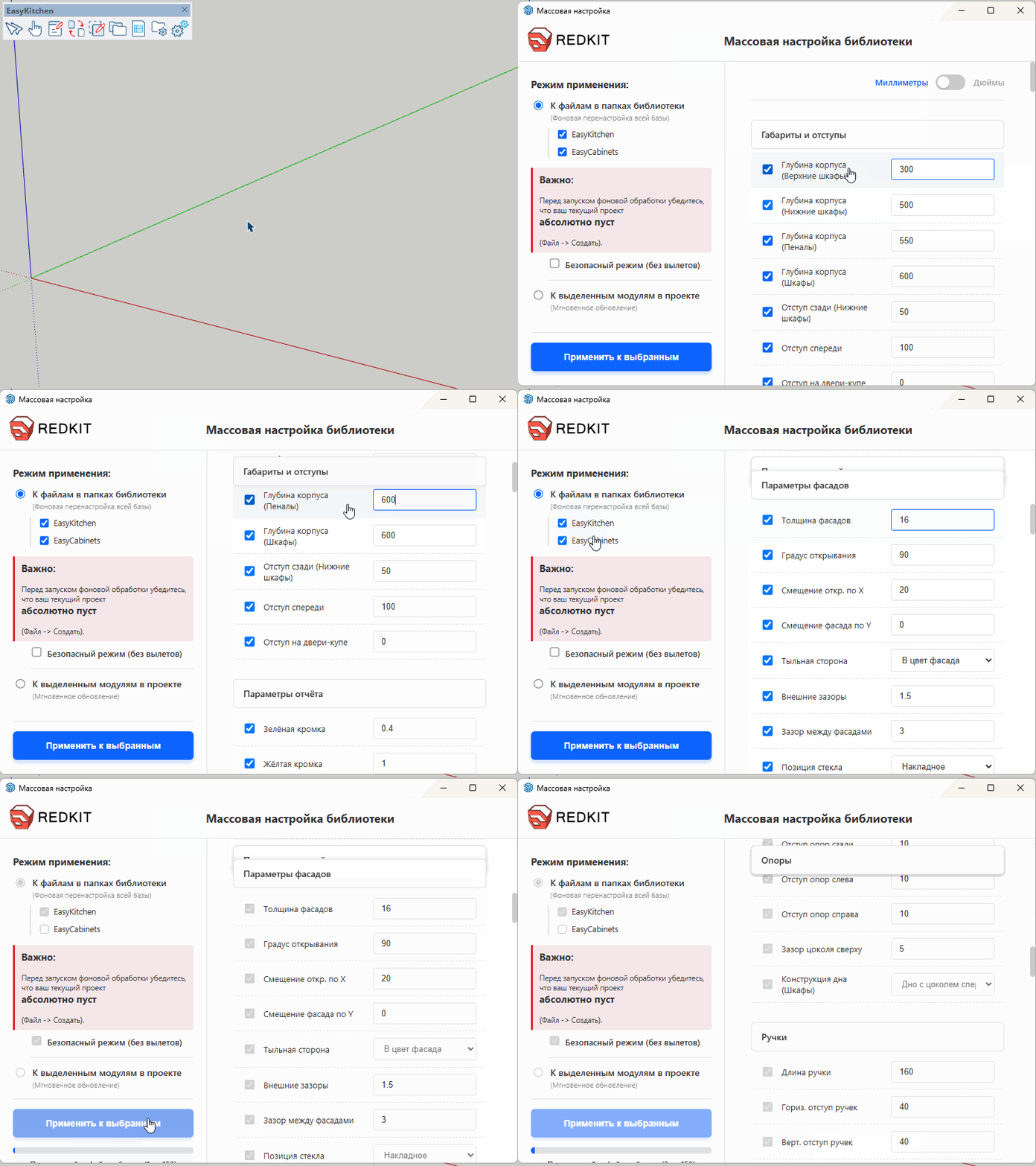
If you are applying the configuration to modules already placed in the current project, no preparation is required.
Simply select the modules you want to update and start the process.
Important Notes
The tool contains numerous internal validation rules based on folder paths, folder names, file names, and component names.
These rules allow EasyKitchen to selectively apply certain settings only to the components where they are appropriate.
For this reason, Bulk Library Configuration should only be used with the original EasyKitchen library.
If you rename library folders, move files to different locations, or change component names, the tool may no longer be able to locate the required .skp files and will report that they cannot be found.