


Article Contents
General Information
This tool updates the style of all dimensions in the current SketchUp model. The settings are taken from SketchUp's standard Model Info dialog.

How It Works
Launch the tool by clicking its icon. You do not need to select any components beforehand—the tool processes the entire model automatically.
After launching the tool, the following dialog will appear:
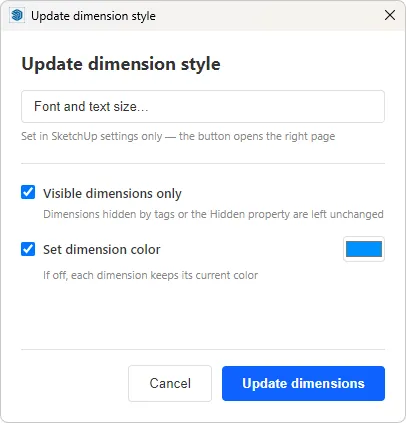
At the top of the dialog, you'll find a button that opens SketchUp's standard Dimension settings. Click it and configure the desired dimension style, such as the font, text size, and other display options.
Once you have finished, close the SketchUp settings window and click Update Dimensions. The new style will immediately be applied to all dimensions in the current model.
Additional Settings
The tool can update either all dimensions or only visible dimensions. To update only visible dimensions, enable the corresponding option in the tool settings. In this mode, the new style will be applied only to dimensions that are currently visible.
This is especially useful if your model contains different types of dimensions on separate tags. For example, in EasyKitchen, facade dimensions and cabinet dimensions are placed on different tags, allowing you to apply a different style to each group independently.
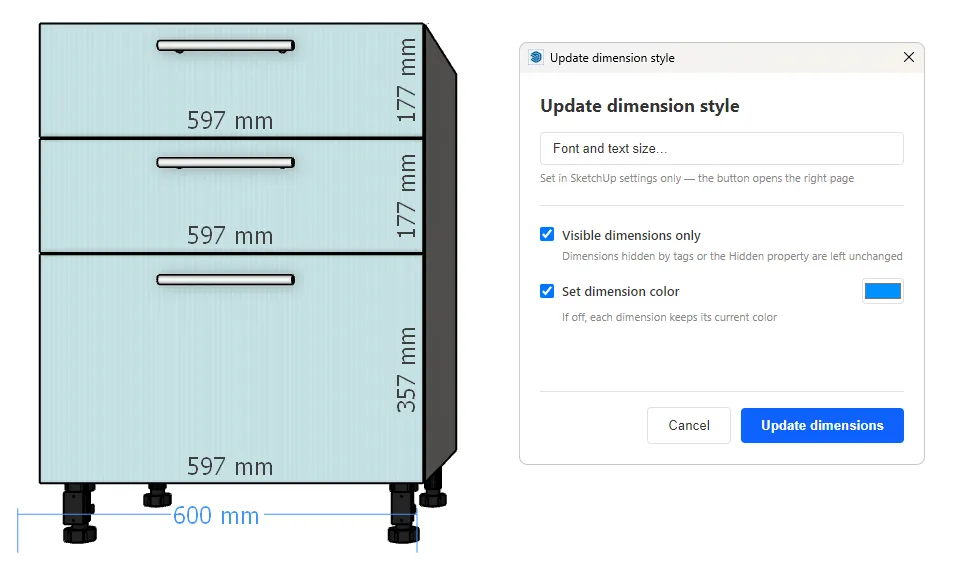
You can also customize the dimension color. Enable the corresponding option in the tool settings and choose the desired color using the built-in color picker.
Known Issue
SketchUp has a long-standing bug that has existed since 2008. Under certain conditions, dimensions created in a specific way are considered invalid and are automatically removed by SketchUp's internal cleanup process. This typically happens when the model is saved or during Auto Save.
In EasyKitchen, this affects cabinet dimensions. After using the Update Dimension Style tool, these dimensions will be deleted the next time the model is saved.
Please keep this limitation in mind. In the next version of the library, these dimensions will be generated differently, eliminating this issue after using the tool.